Problem:
Due to the Coronavirus pandemic, Quarantine and Lockdown are two prominent words from the year 2020. The word Quarantine means isolating things such as a COVID-19 positive patient to prevent the spread of the disease.
Does the keyword Quarantine have a relationship with Windows Failover Clusters? We will explore the following topics in this tip to find out.
- What do we mean by a Quarantine of Windows Failover Cluster nodes?
- How do we get rid of a Quarantine node?
Solution:Recently, while working with my Windows Server 2016 Failover Cluster for Availability Groups, I found the Quarantined status for one of the nodes.
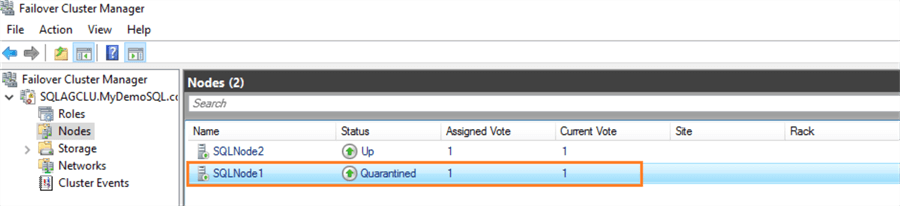
To simulate the scenario, I shut down SQLNode1 three times. It transitions the status from Up to Quarantined. However, in the above screenshot, it shows a green arrow for quarantined status because the node is online, but it is not joined with the cluster.
I verified the following for troubleshooting purposes.
- Quarantined node [SQLNode1] is online
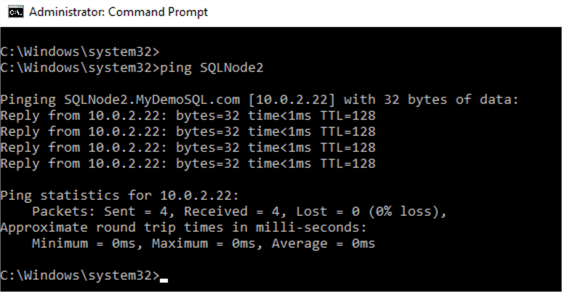
- You also get a ping response from the healthy node to Quarantined node.
- The connection to SQL instance [SQLNode1\INST] is successful.
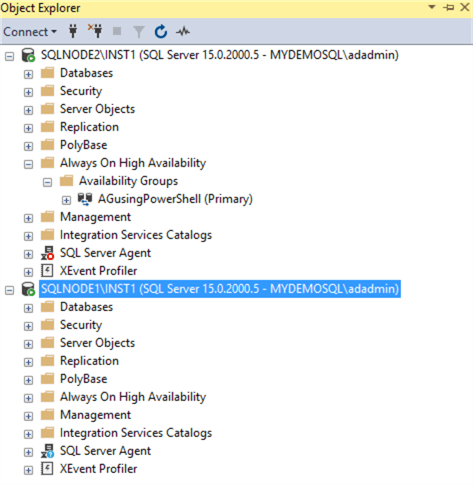
However, the Availability Group dashboard is not synchronized. It shows a warning symbol for the quarantined replica.
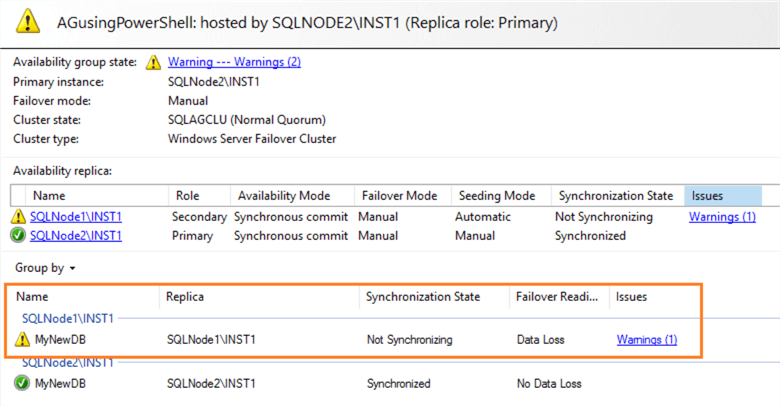
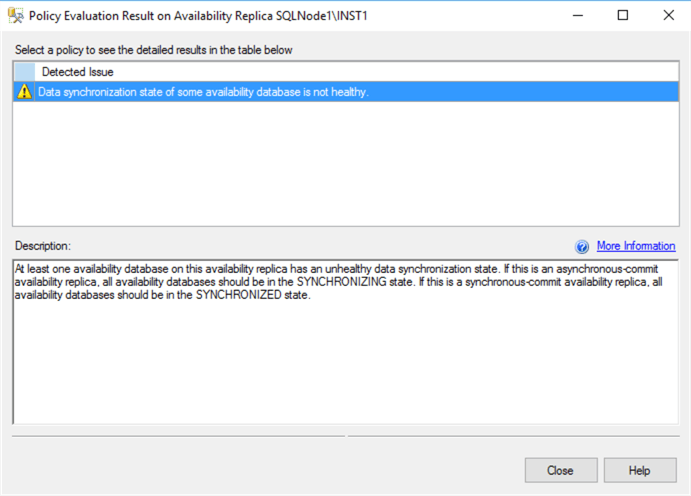
If you click on the Warnings (1), it complains about the unhealthy data synchronization state for the quarantined replica.
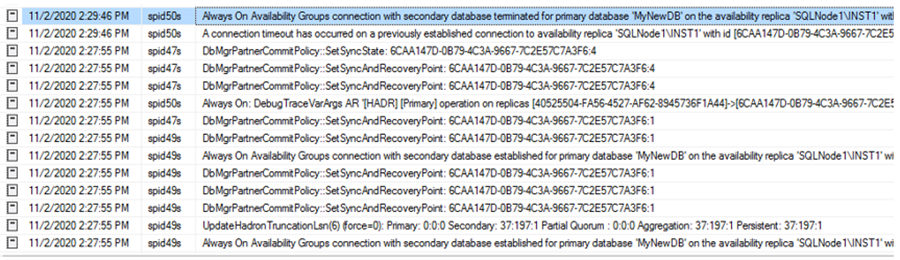
Let’s view the SQL Server logs to investigate the synchronization issue. Here, you get information about terminating the connection from the secondary replica SQL instance. It does not specify the reason like the node quarantined in the SQL Server logs. Therefore, it is essential to examine the SQL logs as well as failover cluster logs while investigating the AG synchronization issues.
Quarantined nodes in Windows Failover Clusters
Starting with Windows Server 2016, Microsoft has improved the Virtual Machine Compute Resiliency. It safeguards your clusters from transient failures. If any failover nodes leave the cluster three times in an hour, WSFC does not allow the node to rejoin the cluster for the next 2 hours. The node might have issues due to network failures, hardware, or power issues. The Quarantined node helps prevent the unstable cluster state or quorum loss.
To get more details, filter the cluster properties with the Quarantine property using the Get-Cluster PowerShell command.
Get-Cluster | Format-List -Property Quarantine*
It returns two properties, QuarantineThreshold and QuarantineDuration, with their default values.
- QuarantineThreshold: Defines the maximum number of times a node can go into isolation before it is quarantined. By default, it has a value 3.
- QuarantineDuration: Defines the period the node will be in the quarantined state. By default, the value is 7200 seconds, or 2 hours.
Track the remaining QuarantineDuration for a node in Quarantined status
As we saw earlier, my [SQLNode1] is already in the quarantined state. For the QuarantineDuration, it remains like this status for 2 hours. However, the question remains – When will my node will be back in its normal status?
To track the remaining time for QuarantineDuration out of 7200 seconds, we can view the cluster events. Click on the cluster name and you will see Recent Cluster Events with the latest warnings, errors, and critical errors.

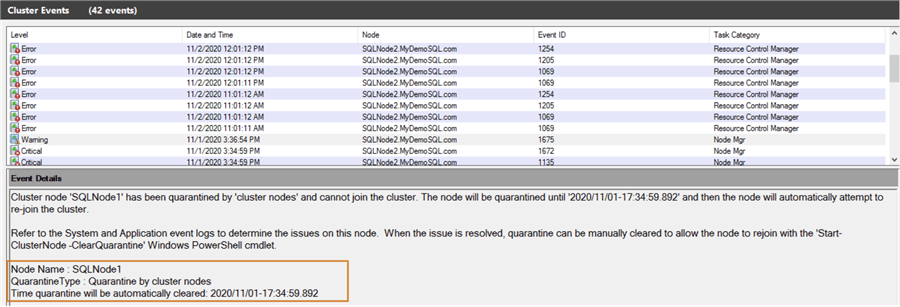
In cluster events, you can see the exact event details.
- The node experienced ‘3’ (default value of QuarantineThreshold) consecutive failures in an hour. The node is removed from the cluster to avoid further disruptions.
- It gives you a timestamp that says when the quarantine will be automatically cleared.

It also logs a warning message stating the quarantine type. According to the message, the cluster node cannot join the cluster automatically until the specified timestamp.
Cluster node ‘SQLNode1’ has been quarantined by ‘cluster nodes’ and cannot join the cluster. The node will be quarantined until ‘2020/11/01-17:34:59.892’ and then the node will automatically attempt to rejoin the cluster.
Manually remove the quarantine status for Windows Failover Cluster
It is unlikely that we want to wait another 2 hours for node availability after the defined QuarantineDuration of 2 hours. Suppose there were some network connectivity issues between the nodes. Once we investigate and fix these issues, we can remove the quarantine status for the nodes. WSFC allows you to manually use PowerShell command.
To remove the quarantined status manually, we can use Failover Clustering PowerShell and execute the Start-ClusterNode cmdlet with the ClearQuarantine flag. You can also specify –CQ flag in the Start-ClusterNode cmdlet.
Start-ClusterNode -ClearQuarantineThis command returns the node state as Joining, shown below.

It clears the quarantine status for SQLNode1, joins the server back to cluster, and makes it available for failovers. Refresh your Nodes in Failover Cluster Manager and see all nodes in the Up status as shown below.
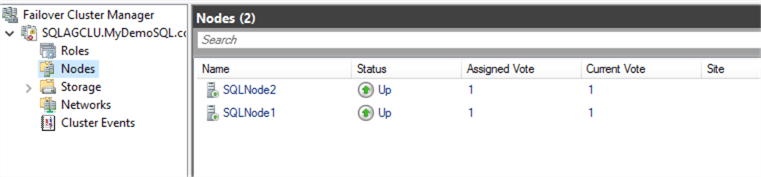
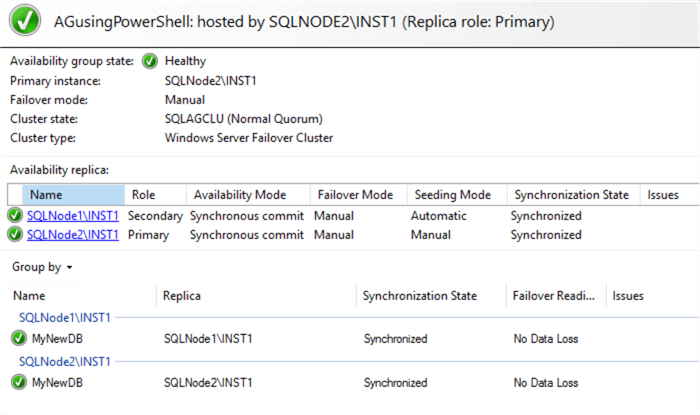
As the cluster transitioned from quarantined to Up status, your AG dashboard is now healthy.
Configuring Quarantine settings for Windows Failover Clusters
We can modify the Windows failover cluster quarantine settings based on our infrastructure requirements.
- Modify the QuarantineThreshold value
Suppose we want to modify the QuarantineThreshold value to 2 failures in an hour. For this purpose, run the following Windows PowerShell command.
(Get-Cluster).QuarantineThreshold=2It changes the quarantine threshold, as shown below.

- Modify the QuarantineDuration value from default 7200 seconds to 3600 seconds
(Get-Cluster).QuarantineDuration=3600
For this demonstrations purpose, let’s change the QuarantineDuration to three minutes (180 seconds).

To validate these settings, I forced the Windows failover cluster to transition SQLNode1 into quarantined status (forced shutdown twice).
At this time, since the SQLNode1 is down, it shows a red down arrow for Quarantined status.

In the cluster critical events, we can verify that SQLNode1 went into quarantined status after two consecutive failures (within an hour).

This time the SQLNode1 joins the cluster automatically after 180 seconds.
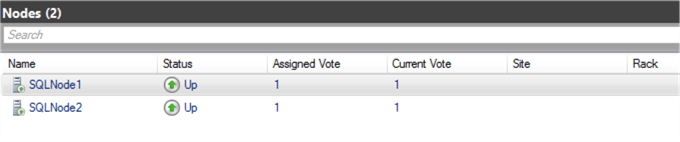
Note: At any given time, Windows Failover cluster does not allow more than 25% of nodes to be quarantined.
Conclusion
In this article, we explored the Windows Failover Cluster resiliency improvement in Windows Server 2016. It puts the node into quarantined state and stops clusters communications. If you use SQL availability groups, it goes into Not Synchronizing state despite the SQL instance availability.


No comments:
Post a Comment